Cookies for analytics and advertising
We use cookies for analytics and advertising, both sent to Google. Refusing changes nothing you can see.Read the privacy page
Converting JPG to GIF makes a photograph look worse and usually does not make it smaller, because a GIF can hold only 256 colours and a photograph contains tens of thousands. It also cannot produce an animation from a single image. If something specifically demands a GIF, drop the file above and you will get a valid one, free and without an upload.
Up to 100 files at once. Mixed formats are fine.
They convert one after another and download together as a ZIP.
JPG to GIF
It is worth saying plainly before you convert anything: turning a photograph into a GIF makes it worse and rarely makes it smaller. If something has not specifically demanded a GIF, you almost certainly want a different format.
The reason is a limit built into GIF from 1987. A single GIF image can contain at most 256 distinct colours. That was generous when screens could not show more, and it is nothing at all next to a photograph, which routinely contains tens of thousands.
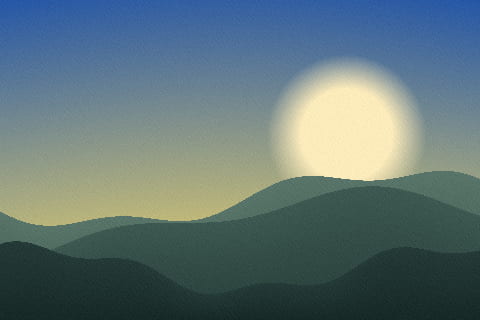
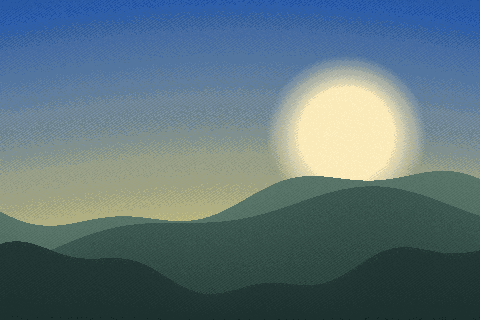
Converting means choosing 256 colours to stand in for all of them, and the shortfall is visible in exactly the places you look: a clear sky bands into visible stripes, skin tones go blotchy, gradients turn into steps. No quality setting fixes it, because it is not a quality setting — it is the format.
The size argument does not rescue it either. GIF compression was designed for flat areas of identical colour, the kind of thing an icon or a simple diagram is made of. A photograph has almost none of that, so GIF compresses it badly, and a GIF of a photo is frequently larger than the JPG it came from as well as looking worse. You give up appearance and get nothing back.
This is the other common reason people arrive here, and it is a misunderstanding worth clearing up. GIF can hold several frames, which is why it became the format of internet animations — but a JPG is one picture, and one picture cannot animate.
Converting a photograph to a GIF gives you a single-frame GIF, which is a still image in an unusually poor container. Making an actual animation means starting from a video or a series of images, and that is a different tool entirely.
When something on the other end insists. A few older forum systems, some email signature tools, certain ad platforms and a handful of legacy applications accept GIF and nothing else. If you are up against one of those, this will produce a valid GIF and it will be as good as the format allows — and that is genuinely the whole case for doing it.
For anything else: PNG if you need it lossless, WebP if you need it small, or simply keep the JPG. We would rather tell you that than take the conversion.
Faced with 256 slots and a sky that needs a thousand colours, an encoder has two options. It can round every pixel to the nearest surviving colour, which produces clean visible bands. Or it can dither — scatter pixels of two adjacent colours so that the eye mixes them at normal viewing distance.
This page takes the first option and it is not a setting you can change: the encoder maps each pixel to its nearest palette entry and diffuses no error, so every GIF written here is the banded kind. The argument against that choice is real — on a photograph at full size a dither usually reads as the lesser evil. The argument for it is that a dither breaks up the long runs of identical pixels GIF compresses, so the speckled file is also the larger one. Either way, if the banding is the problem the answer is not a different GIF: JPG and WebP keep all sixteen million colours.
The palette is not fixed. Every GIF carries its own, and the encoder decides what goes in it by looking at the picture: colours that occupy a lot of the image earn a slot, and rare ones are mapped to whichever survivor sits closest.
That is why the damage is uneven. A red car against grey concrete comes through better than a sunset, because the first is mostly two families of colour and the second is a continuous sweep through several. If you can crop to the part that matters before converting, the palette has less ground to cover and spends more of itself on what you kept.
The picture survives, reduced. Nothing else does. A JPG from a camera carries EXIF — the date, the model, the exposure, frequently the coordinates — and GIF has no equivalent field that anything reads.
So this conversion strips the metadata as a side effect. Do not lean on that if removing it is the actual goal, because the strip metadata page does it as a stated operation on a format you would want to keep. But it is worth knowing that the GIF arrives anonymous.
Drop a folder of JPGs and the batch takes up to 100 files at once. Each becomes its own GIF and they return as a ZIP, because nothing is uploaded and there is no queue for anyone to wait in. A file past the hundredth is listed but not converted, so a larger set goes in two drops.
The colour reduction and the encoding both run in your browser using code the page downloaded. You can watch the network tab of your developer tools while it works and see nothing carrying the file go out.
| JPG | GIF | |
|---|---|---|
| Full name | JPEG Image | Graphics Interchange Format |
| File extension | .jpg, .jpeg, .jpe | .gif |
| Media type | image/jpeg | image/gif |
| Compression | Lossy — file size is bought with quality | Lossless — nothing is discarded |
| First published | 1992 | 1987 |
| Published by | Joint Photographic Experts Group | CompuServe |
| Specification | ITU-T T.81 | GIF89a |
| Licensing | Open standard | Open standard |
| Standing today | Current | Legacy, still read everywhere |
| Bit depth | 8 | 8 |
| Colour it can describe | RGB, greyscale, YCbCr | indexed palette |
| Largest image | 65,535 px per side | 65,535 px per side |
| Opens in a browser | Every browser | Every browser |
| Considered instead | WebP, AVIF, HEIC | WebP, MP4 |
GIF stores at most 256 colours per frame. A photograph converted into one is reduced to a palette, which is what makes the sky look stepped rather than smooth — it is the format, not a quality setting.
Adobe Photoshop and GIMP read both JPG and GIF, so there is a way to check the result against the original without a second tool.
The result is larger than the original and no better. JPG has already discarded detail, and GIF stores what is left without discarding more — it prevents further loss rather than undoing the first one.
JPG is Joint Photographic Experts Group's format, published in 1992. It records 8 bits per channel.
GIF comes from CompuServe and dates from 1987, specified as GIF89a. GIMP, Adobe Photoshop and ImageMagick all read it.
No. This conversion runs entirely inside your browser, so the file never leaves your device. You can confirm it yourself: open the network tab of your browser's developer tools and convert something. You will see the page load, plus the analytics and advertising the site is paid for with — and nothing carrying your file. The engine behind this particular pair is jSquash, WebAssembly builds of the reference image codecs; your browser fetches it once and caches it.
Yes, and visibly. GIF holds at most 256 colours in one image. A photograph contains tens of thousands, so most of them have to be approximated — skies band into stripes, skin tones go blotchy. There is no setting that avoids this; it is the format.
No. An animated GIF needs several frames, and a JPG is one picture. Making an animation means starting from a video or a sequence of images, which is a different job entirely.
Usually not. GIF compression is designed for flat colour, and it copes badly with photographs — a GIF of a photo is often larger than the JPG it came from, as well as looking worse.
For a still image, almost anything: PNG if it must be lossless, WebP if size matters, or the JPG you already have. GIF is worth choosing only when something specifically demands a GIF and will accept nothing else.
The claims this page makes about JPG and GIF are checkable, and these are the documents that settle them.